Telegram Channel Boosts: Levels, Expiry, and Verification
A Telegram boost helps a channel or group gain levels that unlock platform features. Telegram Premium users can assign boosts, and channels can also receive fixed boosts from Premium giveaways. The level is the feature threshold. It is not the same thing as a promise that a purchased boost will stay for a particular number of days.[1][2]
If you are evaluating a Telegram boost service, check four separate facts before ordering: the correct channel or group, the number of boosts delivered, the stated duration, and the feature or level you actually need. Do not assume that “one level,” “one boost,” and “one month” mean the same thing.
Video summary

How Telegram boosts work
Telegram describes boosts as allocations that Premium users can give to channels and supergroups. As boosts accumulate, the channel or group gains levels. Each level unlocks additional features.[1]
Telegram currently says a Premium subscription includes four boosts that the user can distribute among channels or groups. Its official giveaway documentation also says that gifting Premium gives the sender additional boosts, while boosts generated by a channel giveaway stay with the host channel for the duration of the awarded subscriptions.[2][3]
The channel owner does not create ordinary subscriber boost slots from a setting. The owner shares a boost link, runs a Telegram giveaway, or receives boosts through another eligible route. The people or subscriptions behind those boosts determine how the allocation behaves.
What boost levels unlock
For channels, Telegram states that each level adds one story per day and one custom reaction. Higher levels also unlock appearance controls such as an emoji status, themes, custom wallpapers, profile-cover colors, logos and link styles.[2][4]
Groups use the same level idea but receive a different set of benefits. Telegram lists group stories, appearance options, custom emoji and voice-to-text among the features available as a group levels up.[5]
| Term | What it means | What to verify |
|---|---|---|
| Boost | One allocation applied to a channel or group | How many allocations the listing delivers |
| Level | A feature threshold reached after enough boosts | Your current level, the next threshold and the feature you need |
| Duration | How long a supplied boost is expected to remain | The exact period stated in the selected service |
| Story access | A channel feature unlocked through its level | That the channel reached the required level and the posting admin has the needed rights |
| Appearance feature | A customization made available at a qualifying level | Whether that exact option is unlocked in the current Telegram client |
Expiry and duration are not the same as level
Telegram says user-assigned boosts stay on a channel unless the user moves them elsewhere. Its giveaway documentation is more specific: giveaway-generated boosts remain with the host channel for the duration of the Premium subscriptions awarded by the giveaway.[2][3]
Those official statements do not establish one universal expiry rule for every paid boost listing. A third-party service may describe delivery for a fixed period, but that period is a condition of the selected listing, not a Telegram-wide guarantee. If the wording only says “boost” or “level” and gives no duration, treat the duration as unknown until the provider states it clearly.
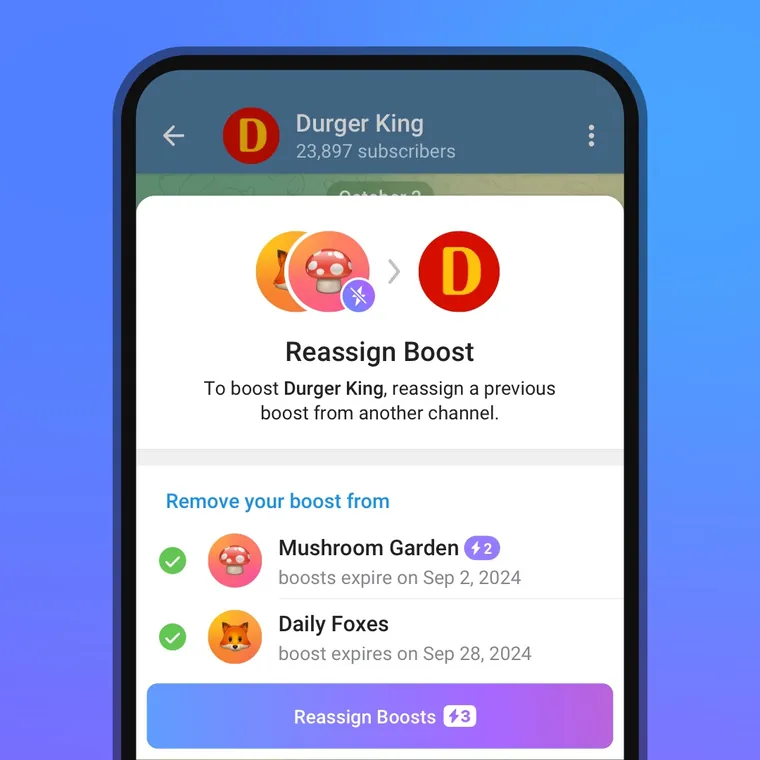
The screenshot is useful because it shows three separate ideas in one place: boost slots can already be assigned, Telegram can offer a reassignment action, and the interface may show an expiry date for an allocation. It does not prove that every boost service uses the same duration.
Find the boost link and activate channel stories
Telegram’s official route for a channel boost link is Channel Info → More → Statistics → Boosts. The Boosts screen shows the channel’s current progress and the special link you can share with Premium users.[2]
Reaching a level is only the first requirement for posting channel stories. Telegram also says the posting admin needs the relevant story permission and a Premium subscription. Once the channel is eligible, the admin can use the story control on the Channel Info page or choose the channel through “Post Story As.”[2] The Telegram story views guide explains how to separate the view counter, viewer list, reactions, and later audience actions after publication.
- Open the exact channel in Telegram and record its current boost count and level.
- Copy the boost link from the channel’s Boosts screen rather than inventing a link format.
- After delivery, reopen the same screen and confirm the displayed count and level.
- Check the intended feature inside Telegram. For stories, verify that the authorized admin can actually open the channel story composer.
Compare the available routes
| Route | Best fit | Main limitation |
|---|---|---|
| Premium member assignments | A channel with engaged Premium subscribers | Users can control and potentially reassign their boosts |
| Telegram Premium giveaway | A channel that wants both a promotion and fixed host-channel boosts | The channel pays for the awarded subscriptions and must run the giveaway |
| Purchased boost service | A buyer who needs a defined quantity or duration without running a giveaway | Terms vary by listing; no service should be treated as permanent unless that is explicitly and truthfully documented |
If your actual goal is to give Premium to a person rather than raise a channel level, use the Telegram Premium buyer guide. OneSMM also has a dedicated Telegram Premium page. Premium access and channel boosts are related, but they are not interchangeable products.
What to verify before ordering boosts
- Target type. Confirm whether the listing supports a public channel, private channel, group, or more than one type.
- Required link. Use the format named in the live listing. A channel URL, invite link and Telegram boost link do different jobs.
- Quantity. Order boosts, not a guessed number of levels. Check the channel’s live threshold first.
- Duration. Look for an explicit period. Do not convert vague words such as stable, lasting or permanent into a number.
- Start and replacement conditions. Read the selected listing for its current delivery and refill terms. Conditions can differ between services.
- Account safety. A normal link-based order should not require your Telegram password, login code, two-step verification password, QR approval or session file.
Save a screenshot of the Boosts screen before ordering. Record the target link, starting count, current level, required next threshold, service description and time. That baseline is more useful than relying on a dashboard status alone.
How to verify the result
Return to the channel’s Boosts screen and compare the displayed count with your baseline. Then verify the intended feature separately. A higher count does not prove that the story composer, appearance control or custom reaction you expected is available to the relevant admin.
If the level later drops, compare the timing with the stated service duration before opening a duplicate order. A drop can mean that an allocation expired or moved, but the screen alone may not identify the commercial cause. Keep the provider’s listing text and order record with your Telegram screenshots.
When you are ready to compare current listings, open the OneSMM service catalog and search the live Telegram categories. Use the selected service description as the source for its present quantity, duration and link requirements.
Sources
[1] Telegram Core: channel and supergroup boosts
[2] Telegram: Stories in Channels, View-Once Media and More
[3] Telegram: Giveaways in Channels and Free Premium