Public vs Private Telegram Links for SMM Orders
By Kakhi P. — Operations
Use a public Telegram link unless the selected service explicitly says it accepts private links. A public username link lets the delivery system open the channel, group, or post without joining first. A private invite link controls access, may expire or be revoked, and may require administrator approval. Those differences can decide whether an order starts or fails.
Do not guess from the service category alone. Read the exact listing, copy the destination it requests, and test that link outside your own Telegram session before you submit it.
Public and private Telegram links do different jobs
A public channel or supergroup has a username. Its link normally follows the t.me/username pattern, and Telegram says public channels can be found in search and joined by anyone. A private channel has no public username route. People need to be added or receive an invite link.
Telegram documents private invite links in the t.me/+hash format. Administrators can set an expiry time, a usage limit, or a join-request requirement. They can also revoke a link. That makes an invite useful for access control, but less predictable as an input for an automated order.
| Link type | What it identifies | Typical order use | Main check |
|---|---|---|---|
| Public username link | A public channel or supergroup | Member or group tasks when the listing asks for a channel or group URL | Open it while logged out and confirm the intended destination appears |
| Public post link | One message in a public channel | Views, reactions, shares, comments, or other post-specific tasks | Confirm the link opens the correct post, not the channel homepage |
| Private invite link | Access to a private channel or group | Only when the selected listing explicitly accepts private links | Check expiry, usage limits, revocation, and join-request settings |
| Private message link | One message visible only to authorized members | Only when the listing supports private post access and requests this format | Test with an account that has the same access the provider will have |
Match the link to the service input
The useful question is not simply whether the Telegram destination is public or private. It is whether the service can reach the exact object it needs. A member service may need a channel or group link. A views service needs one post. An auto-views service may need the channel itself because it watches future posts. The Telegram comments guide shows why a post link and an invite link are not interchangeable for discussion threads.
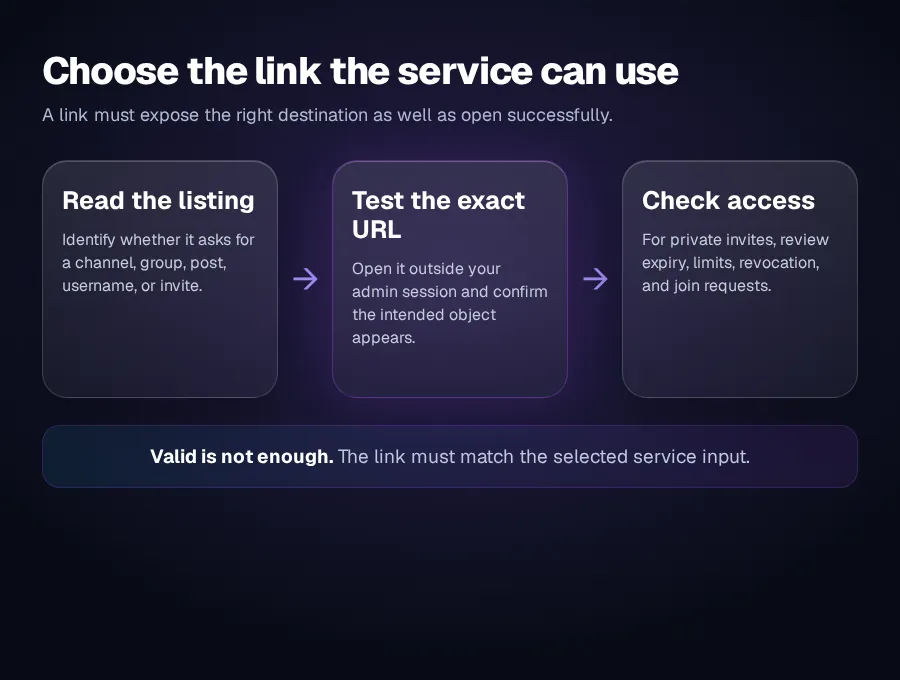
A link can be valid in Telegram and still be wrong for the order. For example, an invite link may open a channel but not identify the post that should receive views. A public channel homepage may be easy to reach but still fail a post-specific task.
How to test a Telegram link before ordering
- Read the listing's Link Type or description. Look for an explicit channel, group, post, username, or public/private requirement. If the field is vague, do not assume compatibility.
- Copy from the intended destination. Open the channel, group, or individual post and use Telegram's copy-link action. Avoid copying a link from a forwarded message when the original post is the target.
- Test access outside your usual session. Use a logged-out browser or another account where appropriate. Confirm what a person without your administrator permissions can actually see.
- Check private-link controls. An expired, revoked, exhausted, or approval-only invite can block access. Create or select an invite whose settings fit the task, but do not weaken your community's privacy merely to make an incompatible service work.
- Save the submitted URL. Keep the exact link with the order record so you can verify the same destination later.
Private invite links need extra checks
Telegram lets administrators create multiple invite links and control each one separately. A link can have an expiry date, a limited number of uses, or a join-request step. Telegram also lets administrators revoke links and review who joined through a particular invite.
Those controls are useful for community management. They also mean a private link that worked during setup may stop working before an order starts. Do not reuse an old invite without opening it first. If join requests are enabled, a delivery system may reach a pending approval state rather than the channel itself.
Avoid posting a private invite in public support tickets, screenshots, or shared documents. If a temporary link was created only for a task, review and revoke it when the task is complete and the service no longer needs access.
Common link mistakes
- Submitting the channel homepage for post views. The service cannot infer which post should receive the views.
- Submitting an invite link for a public post task. The invite controls entry but does not identify the target message.
- Using an administrator-only message link. It may open for you and fail for anyone without membership.
- Changing the username after ordering. The saved public link may stop resolving to the expected destination.
- Revoking the invite too early. A private-link task can lose access before delivery begins or finishes.
- Giving account credentials instead of a link. A normal link-based order should not require your Telegram password, login code, two-step verification password, QR approval, or session file.
Public is simpler, but privacy can stay private
Making a channel public can simplify access, but it also changes discoverability and who can join. Do not change a private community's access model for an order. First check whether the current OneSMM service catalog has a listing that explicitly supports private links. Some live member listings state that both public and private links are accepted, while the general ordering guide defaults to a public link. The selected listing is the controlling instruction.
If no matching private-link option is visible, use a public-compatible task only for content that is already public, or leave the order unplaced. For the complete ordering sequence, use the OneSMM order guide.