Telegram SMM API: What Resellers Should Test Before Integrating
A Telegram SMM API is useful when it removes repetitive order work without hiding failures. Before you connect one to a reseller panel or agency workflow, run a small live test that covers five things: service-list sync, order creation, status updates, balance reconciliation, and the provider's refill or cancellation paths.
Do not judge the integration by whether one test order reaches Completed. A production-ready setup must also handle a changed service ID, an invalid link, a Partial result, insufficient balance, and an order that stays in progress longer than expected. Those are the cases that create support tickets and incorrect customer balances.
Video summary

First, make sure you mean the right API
A Telegram SMM API is a supplier-ordering interface. Your system sends a service ID, Telegram link, and quantity to an SMM provider, then receives an order ID that it can check later.
It is not Telegram's official Bot API, Telegram API, or TDLib. Telegram describes its Bot API as an interface for programs that use Telegram messages, while its platform API and TDLib are for building Telegram clients.[3] Those tools interact with Telegram itself. An SMM API connects your storefront or internal tool to a service supplier.
That distinction matters during development. A Telegram bot can collect a customer's order, but the bot does not automatically fulfill it. Your backend still needs to validate the request, call the supplier API, store the supplier order ID, and keep the customer-facing status in sync.
A basic workflow looks like this:
- Your customer chooses a Telegram service.
- Your system validates the public link and quantity.
- The supplier API accepts the order and returns an order ID.
- Your system checks that order until it reaches a terminal state.
- You reconcile the final charge and undelivered quantity before closing the customer order.
Confirm permission before you build
Public API documentation tells you how the interface works. It does not automatically give every account permission to resell a provider's services.
OneSMM's current terms require prior written authorization before reselling or redistributing services. They also state that API access must stay within documented rate limits and may be suspended or revoked.[2] If you plan to sell through a panel, bot, app, or agency storefront, confirm that permission and any account-specific limits before you write the integration.
That check is easy to overlook because the technical connection may work first. Get the commercial permission in writing and keep it with your supplier record. It is much cheaper than rebuilding a live catalog after access is removed.
The minimum capabilities worth checking
Start with the public documentation, not the provider's homepage claims. You need to know exactly which actions the API supports and what each response looks like.
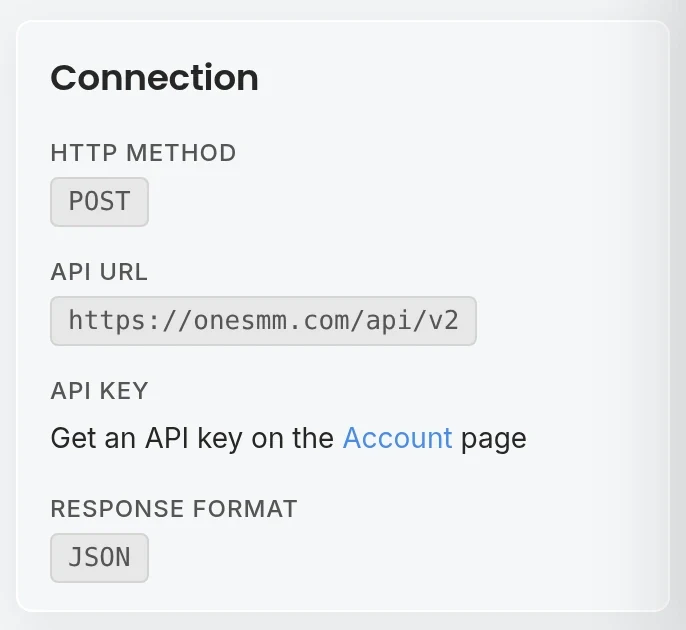
OneSMM's public API, for example, uses HTTP POST requests and JSON responses. Its documented actions include retrieving services, adding an order, checking one or multiple order statuses, checking balance, requesting eligible refills, checking refill status, and requesting cancellation for supported orders.[1]
That gives you a concrete checklist:
- Service discovery: Can your system retrieve service IDs, names, rates, minimums, maximums, and refill/cancel availability?
- Order creation: Which fields are required for each service type? A normal quantity order may not use the same fields as custom comments, polls, or subscriptions.
- Status retrieval: Can you check single orders and batches? Does the response include charge, start count, remaining quantity, and currency? OneSMM documents batch status checks for up to 100 order IDs in one request.[1]
- Balance lookup: Can you stop accepting orders before the supplier balance becomes too low?
- After-order actions: Are refill and cancellation merely advertised, or are they documented actions with their own IDs and statuses?
A feature is not available just because an API has an endpoint with that name. The selected service also needs to allow it. If the service-list response says refill: false, your storefront should not sell that order with refill coverage.
Run a seven-step sandbox test
Use a real account and the smallest sensible order. Do not route a client order through an untested connection.
1. Save a service-list snapshot
Fetch the service list and store the response with a timestamp. Confirm that every service you plan to sell includes the fields your pricing and validation logic need.
Your local record should keep at least:
- supplier service ID;
- internal product ID;
- service name and category;
- rate and currency;
- minimum and maximum quantity;
- refill and cancellation flags;
- last successful sync time.
Do not expose the raw supplier name to customers unless that is intentional. Map the supplier ID to your own stable product ID instead. If the provider later replaces service 123 with service 987, you can update the mapping without breaking old customer orders.
Pass condition: your storefront can disable a removed service and update a changed rate without manual edits in several places.
2. Reject bad input before calling the supplier
Test an empty link, a malformed t.me link, a private or inaccessible destination, and quantities below and above the advertised limits. Your form should reject obvious errors before they become paid supplier orders.
Link rules differ by service. A channel username, group invite link, post URL, and bot username are not interchangeable. Store validation rules at the service level rather than writing one Telegram regex for the entire catalog.
Pass condition: the user receives a useful message that explains what to fix, while the supplier balance remains untouched.
3. Place one controlled order
Submit a small valid order and save the complete request and response after removing the API key from logs. Your database needs both its own customer order ID and the supplier order ID.
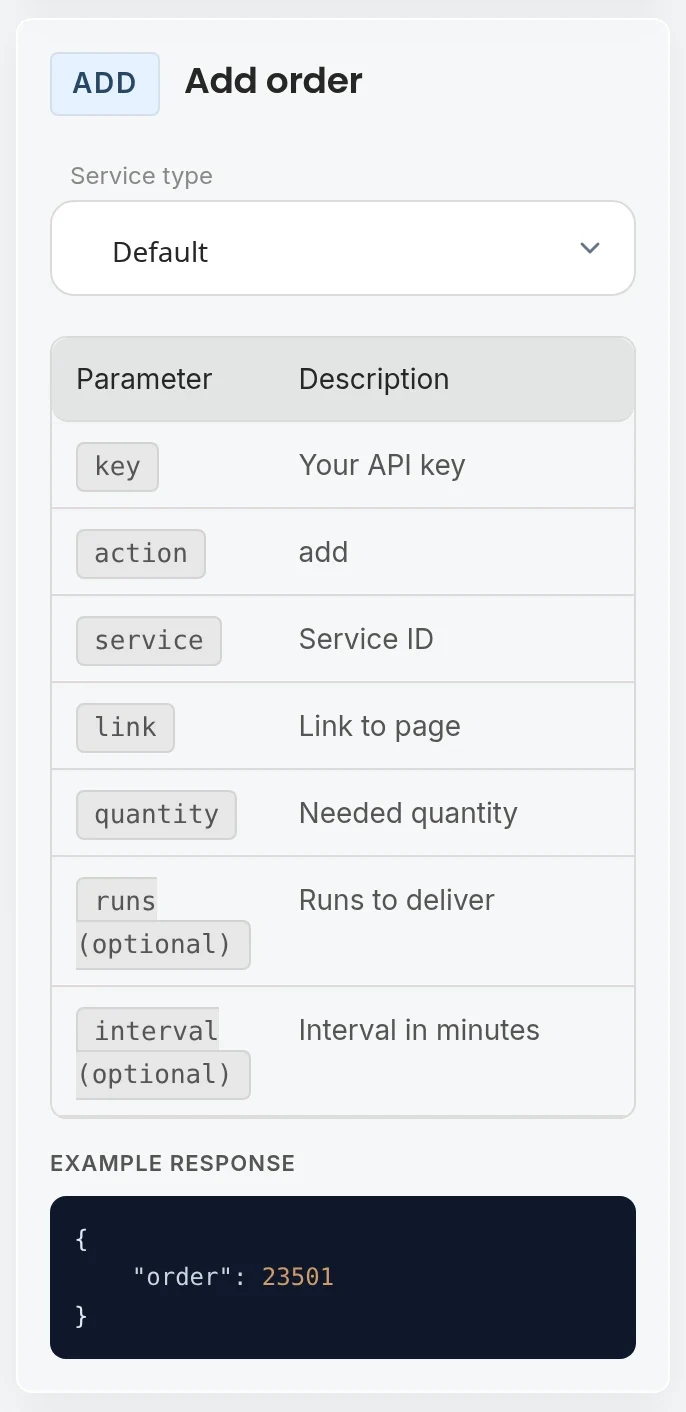
For the OneSMM API, a normal order request uses an API key, the add action, service ID, link, and quantity. The documented response returns an order ID.[1]
Do not mark the customer order as completed at this point. An accepted request only proves that the supplier created an order record.
Pass condition: one customer order maps to one supplier order, and repeating a timed-out request cannot silently create an untracked duplicate.
4. Map every status you can receive
Your customer does not need the supplier's internal wording, but your operations team does need to preserve it. Keep the raw status and map it to a smaller customer-facing set.
| Supplier state | What your system should do |
|---|---|
| Pending | Keep the order open and show that fulfillment has not started |
| In progress | Continue polling at a reasonable interval |
| Completed | Reconcile the final response, then close the order |
| Partial | Record the delivered and remaining quantity, then reconcile the undelivered portion |
| Canceled | Stop polling and apply the provider's balance-credit rules |
| Unknown or error | Keep the raw response, alert operations, and avoid guessing |
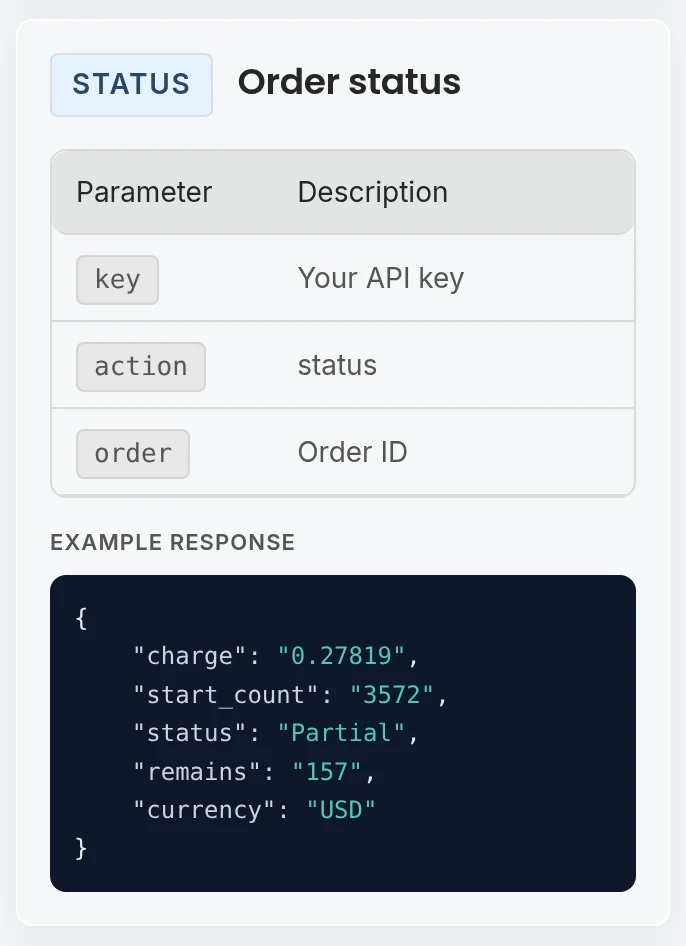
OneSMM's public status example includes charge, start_count, status, remains, and currency; its example state is Partial.[1] That is a good reminder that the happy path is only one path.
For a plain-language reference you can share with customers or support staff, use the SMM panel order status guide to compare Pending, Processing, Completed, Partial, and Canceled records with the destination and order fields.
Pass condition: a Partial order cannot appear as fully delivered, and an unfamiliar status cannot be converted to Completed by default.
5. Reconcile money separately from status
Your retail charge and supplier charge are different records. Keep them separate.
When an order becomes partial or canceled, calculate the customer adjustment from your own pricing policy and the final delivered quantity. Do not copy the supplier's wholesale credit directly into the customer's retail ledger. Also confirm where the provider returns credits. OneSMM's current terms state that canceled orders and undelivered portions are returned to the account balance rather than the original payment method.[2]
A simple reconciliation record should show:
- quantity requested;
- quantity delivered;
- supplier charge;
- customer charge;
- customer credit, if any;
- who or what applied the adjustment;
- timestamp and raw supplier response ID.
Pass condition: an operator can explain a customer's final balance without reconstructing it from chat messages or API logs.
6. Test refill and cancellation as separate workflows
A refill request is not the same as a completed refill. Save the refill ID, poll its status, and show the result separately from the original order. The OneSMM examples treat Completed and Rejected as distinct refill outcomes.[1]
The same caution applies to cancellation. An API may accept a cancellation request only for orders or services that support it. OneSMM's service-list examples expose refill and cancel flags, and its documentation defines separate actions for creating and checking refills.[1]
Your customer interface should therefore say Refill requested before it says Refill completed.
Pass condition: the system records a rejected refill or cancellation instead of hiding it behind a success notification.
7. Simulate the failures you expect in production
Finish the test with failure cases:
- wrong API key;
- insufficient supplier balance;
- removed or disabled service ID;
- network timeout;
- malformed JSON or an HTML error page;
- the same link submitted twice while an order is active;
- a valid order that stays non-terminal for an unusual length of time.
The duplicate-order case deserves its own guard. OneSMM's terms say not to place a second active order for the same service and link, or to run the same link through another provider at the same time, because delivery and drops cannot be attributed cleanly.[2]
Pass condition: each failure creates a known operational state. None of them loses money silently, leaks a key, or tells the customer that delivery is complete.
Polling, retries, and logs
The public OneSMM documentation provides status-check actions rather than advertising a webhook on the page.[1] If your chosen provider works the same way, design for polling unless support confirms another mechanism.
Poll quickly enough to keep orders useful, but do not hammer the endpoint. Increase the interval for long-running orders, stop when the order reaches a terminal state, and respect documented rate limits. OneSMM's terms require responsible API use within the limits stated in its documentation.[2]
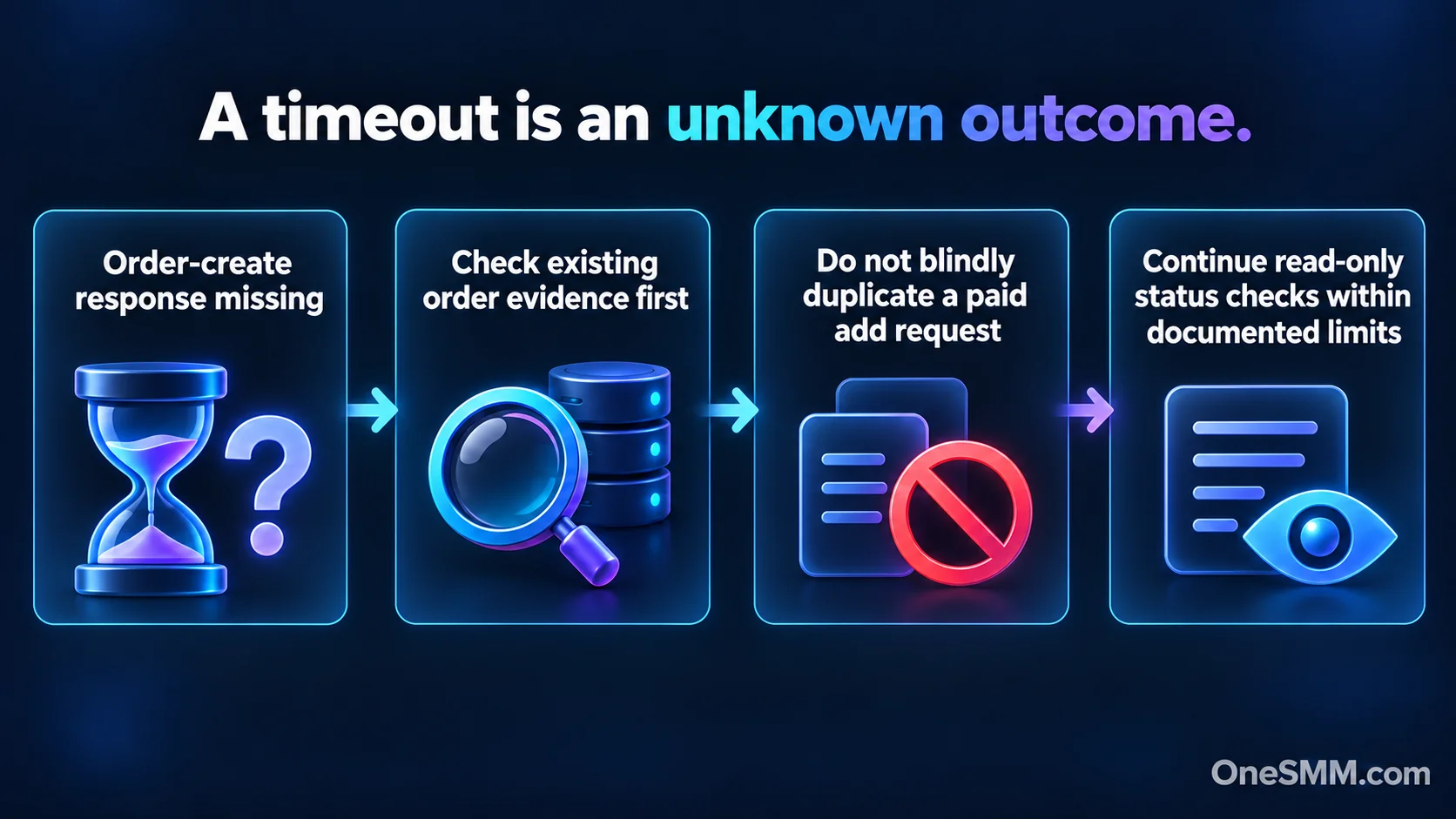
Retries need more care on order creation than on status checks. Repeating a status request is normally read-only. Repeating an add request after a timeout may create a second paid order if the first request succeeded but its response never reached you.
At minimum, log:
- your request ID;
- customer and supplier order IDs;
- action name;
- response code and parsed status;
- attempt count;
- timestamps;
- redacted request and response bodies.
Never write an API key into an application log, analytics event, support screenshot, or browser-side script. Keep it on the server and rotate it if it is exposed.
A practical go/no-go sheet
Do not choose an API only because the first order was fast. Approve the integration when you can answer yes to the operational questions below.
| Check | Go when... |
|---|---|
| Documentation | Required fields and response examples are clear |
| Catalog sync | Removed services and rate changes do not break your storefront |
| Validation | Bad links and quantities fail before a paid request |
| Order tracking | Every supplier order ID maps to one customer order |
| Status handling | Partial, canceled, error, and unknown states are preserved |
| Accounting | Supplier costs and customer credits reconcile independently |
| Refill/cancel | Availability comes from the service record and outcomes are tracked |
| Recovery | Timeouts and API errors produce alerts and safe retry behavior |
| Security | Keys stay server-side and are redacted from logs |
| Support | You know how to escalate a stuck or disputed order with evidence |
If two or three rows are still guesses, the integration is not ready for client traffic. Keep it in test mode and resolve those gaps first.
Where OneSMM fits
OneSMM publishes its API actions and response examples, so you can review the contract before building. The API covers service retrieval, order placement, balance and status checks, batch status lookup, eligible refill flows, and cancellation requests.[1]
Use the checklist above against the documentation, then connect only the Telegram services you have tested. If you are still choosing what to resell, read the SMM reseller panel guide first. If you already know the business model and want to evaluate the supplier connection, review the OneSMM API documentation and start with one controlled order rather than routing your full catalog on day one.
Sources
[1] OneSMM API documentation
[2] OneSMM Terms of Service
[3] Telegram APIs