Telegram Auto Views: How Future-Post Delivery Works and Which Link to Submit
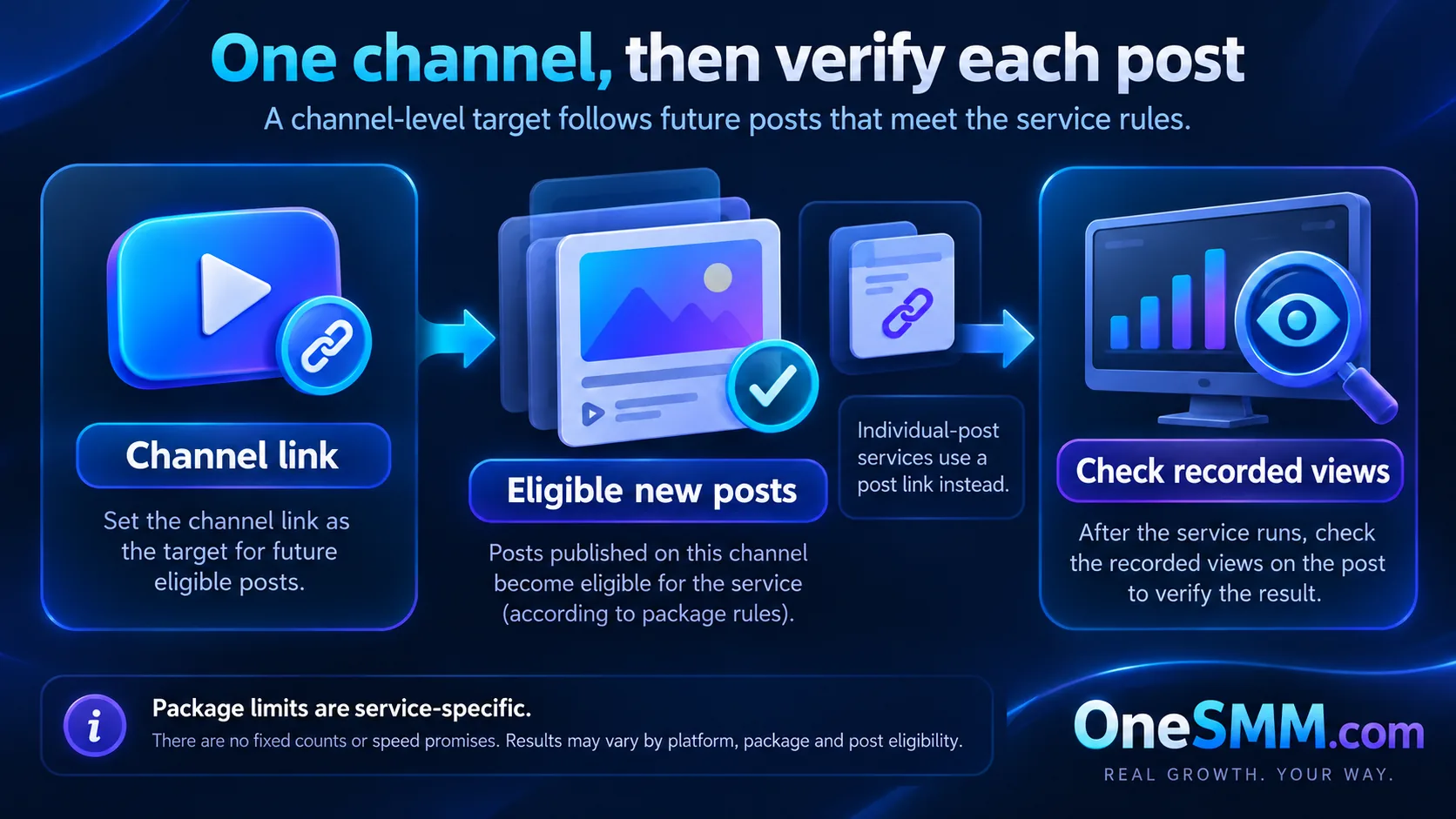
Telegram auto views apply a chosen view quantity to future channel posts under the limits of the selected service. You submit the channel target once, then the service watches for new posts during its covered post count or subscription period. That is different from a standard post-view order, which targets one existing message.
Before ordering, confirm the required channel-link format, views per post, covered future-post count, activation delay, delivery pace, and stop conditions. Do not treat “auto” as proof of instant delivery, permanent coverage, organic reach, or a specific number of posts unless the current listing says so.
Video summary

How automatic future-post delivery works
An auto-view order is a standing instruction tied to a channel rather than a single message. After activation, the service detects eligible new posts and applies the selected quantity to each one until the package ends. The exact trigger, delay, supported channel type, and coverage depend on the selected listing.
Telegram itself stores a separate view counter for each channel message. Its Channels guide also notes that forwarded copies contribute to the displayed total. That means the number you see can include more than one traffic source; an auto-view order does not give you exclusive attribution for every added view.[1][2]
The service should support your publishing schedule, not replace it. Views can make the visible counter more consistent, but they do not prove that people read the full post, clicked a link, joined the channel, or bought anything.
Submit a channel link, not one post link
A public channel link identifies the feed that will receive future posts. It normally looks like https://t.me/yourchannel. A public post link adds a message number, such as https://t.me/yourchannel/125. That second form points to one existing post and belongs to a single-post order unless the service description explicitly says otherwise.[3]
Private channels may use invite links or other formats, but support is service-specific. Never assume a private invite is accepted because a public username works. Copy the exact target requested by the live listing.
Compare the package terms before ordering
| Field | What it controls | What to record |
|---|---|---|
| Views per post | The quantity intended for each eligible new post | The selected quantity and starting counter on each test post |
| Future-post coverage | How many later posts, or how much subscription time, the package covers | The exact limit shown in the current listing |
| Activation and delay | When monitoring begins and how long delivery may wait after publishing | Order time, publication time, and first observed movement |
| Delivery pace | Whether views arrive quickly or over a longer window | The stated pace and the actual change over time |
| Target rules | Public/private eligibility and accepted URL format | The submitted link and the channel's visibility state |
| Stop or cancellation terms | Whether an active subscription can be stopped or changed | The listing text and support instructions before purchase |
Check the current service description at order time. Catalog terms can change, and one auto-view service can use different limits from another service on the same panel.
Run a small controlled test
- Choose a public test channel or a channel where you can document the baseline safely.
- Save the exact listing text, channel link, package limit, and order ID.
- Publish one ordinary post after the order is active. Record its time and starting view count.
- Wait through the listing's stated start window rather than guessing an instant deadline.
- Check the same post again, then repeat the check on the next eligible post.
A two-post check is more useful than looking at one lucky result. It confirms whether the standing subscription continued to detect new content instead of merely affecting the first post after activation.
How to verify delivery without confusing the signals
Read the public counter on each covered post and compare it with your saved baseline. Then use Telegram analytics or your own tracked links for the business result. Keep these measurements separate:
| Signal | Useful for | Does not prove |
|---|---|---|
| Post view counter | Checking whether the visible total changed on that message | Who watched, how long they read, or why every view appeared |
| Coverage across later posts | Checking whether the subscription continued after the first post | That all future posts are covered beyond the listed limit |
| Link clicks | Measuring response to a tracked call to action | That every viewer saw or understood the offer |
| Joins or sales | Measuring downstream outcomes | That auto views alone caused the result |
Common reasons a new post receives nothing
- The subscription was not active yet. The post may have been published before monitoring began.
- The wrong target was submitted. A numbered post link does not identify the future channel feed.
- The channel visibility changed. A service that requires a public channel may stop when the target becomes private.
- The package ended. The covered post count or subscription period may already be exhausted.
- The post type is not supported. Some listings can exclude certain formats or destinations.
- Delivery is still inside the stated window. Start time and completion time are different.
Do not create a duplicate subscription before checking those points. Overlapping auto orders make later verification harder and can apply more views than you intended.
Auto views versus one-time post views
| Use case | Auto views | One-time post views |
|---|---|---|
| Target | A channel or supported subscription target | One specific post URL |
| Timing | Future eligible posts after activation | An existing message |
| Best fit | Channels publishing repeatedly with a defined baseline need | A single announcement, campaign post, or isolated correction |
| Main risk | Forgetting the coverage limit or creating overlapping subscriptions | Submitting the wrong message or expecting later posts to receive views |
If you only need one existing message, use the Telegram post views guide before choosing a service. If you publish regularly and the subscription format fits, compare the current terms on the Telegram auto views page. For evaluating whether those counters support a real promotion decision, use the Telegram channel analytics checklist.
What auto views can and cannot do
Auto views can reduce the manual work of ordering for each new post and can create a more consistent visible baseline. They cannot make a weak post useful, choose the right audience, guarantee discovery, or establish trust on their own. Telegram does not provide an open recommendation feed where a purchased counter automatically earns distribution.
Use the service only after the channel has a clear topic, a sustainable publishing schedule, and a way to measure clicks, replies, joins, or sales. Choose the smallest package that answers your operational question, save the original terms, and verify more than one future post before scaling.